Hosting Static HTML Pages Using AWS Lambda and API Gateway

AWS Lambda and API Gateway are commonly used to create microservice JSON endpoints. In such applications, the static html content is usually stored in an S3 bucket. However if you are building a quick AWS lambda microservice prototype, it would be simpler to render static HTML from a lambda function. This has a number of advantages.

  • We just need one Java project containing all lambda functions and the static content.
  • We can host the microservice endpoints and static html on the same domain created by API gateway without any further configuration.

How to Host HTML Pages Using AWS Lambda and API Gateway

The following tutorial contains step by step instructions for hosting static html content using AWS lambda and API gateway. AWS lambda supports multiple language runtimes. The following sample code is written in Java and uses the AWS Java API.

The following lambda function reads an html file from the classpath and then prints it to the response object. Note that if you are building your Java project using Maven (which I highly recommend), this html file should be copied to src/main/resources folder.

package com.quickprogrammingtips.lambda;

import java.io.IOException;
import java.io.InputStream;
import java.io.OutputStream;


import com.amazonaws.services.lambda.runtime.Context;
import com.amazonaws.services.lambda.runtime.RequestStreamHandler;
import com.amazonaws.util.IOUtils;

// Render static HTML from AWS Lambda function 
public class ShowHtmlLambdaHandler implements RequestStreamHandler {

	@Override
	public void handleRequest(InputStream is, OutputStream os, Context context) throws IOException {
        context.getLogger().log("Displaying html content" );
        try {
    		ClassLoader loader = ShowHtmlLambdaHandler.class.getClassLoader();
    		try(InputStream resourceStream = loader.getResourceAsStream("hello.html")) {
    			os.write(IOUtils.toByteArray(resourceStream));
    		}
        }catch(Exception ex) {
        	os.write("Error in generating output.".getBytes());
        }
	}
}

The following maven pom.xml contains the minimum dependencies for the above implementation. Use this pom file if you want to minimize the size of the fat jar uploaded to AWS lambda. Note the use of maven shade plugin to embed dependent jars in the final fat jar. if you don't use shade plugin, you will get ClassNotFoundException when you run the lambda function in AWS.

<project xmlns="http://maven.apache.org/POM/4.0.0" xmlns:xsi="http://www.w3.org/2001/XMLSchema-instance"
	xsi:schemaLocation="http://maven.apache.org/POM/4.0.0 http://maven.apache.org/xsd/maven-4.0.0.xsd">
	<modelVersion>4.0.0</modelVersion>
	<groupId>com.quickprogrammingtips.lambda</groupId>
	<artifactId>htmllambda</artifactId>
	<version>0.0.1-SNAPSHOT</version>

	<name>htmllambda</name>

	<properties>
		<project.build.sourceEncoding>UTF-8</project.build.sourceEncoding>
		<maven.compiler.source>1.8</maven.compiler.source>
		<maven.compiler.target>1.8</maven.compiler.target>
	</properties>

	<dependencies>
		<dependency>
			<groupId>com.amazonaws</groupId>
			<artifactId>aws-java-sdk-s3</artifactId>
			<version>1.11.98</version>
		</dependency>

		<dependency>
			<groupId>com.amazonaws</groupId>
			<artifactId>aws-lambda-java-core</artifactId>
			<version>1.1.0</version>
		</dependency>
		<dependency>
			<groupId>com.amazonaws</groupId>
			<artifactId>aws-lambda-java-events</artifactId>
			<version>1.3.0</version>
		</dependency>
	</dependencies>
	<build>
		<plugins>
			<plugin>
				<groupId>org.apache.maven.plugins</groupId>
				<artifactId>maven-shade-plugin</artifactId>
				<version>2.3</version>
				<configuration>
					<createDependencyReducedPom>false</createDependencyReducedPom>
				</configuration>
				<executions>
					<execution>
						<phase>package</phase>
						<goals>
							<goal>shade</goal>
						</goals>
					</execution>
				</executions>
			</plugin>
		</plugins>
	</build>
</project>

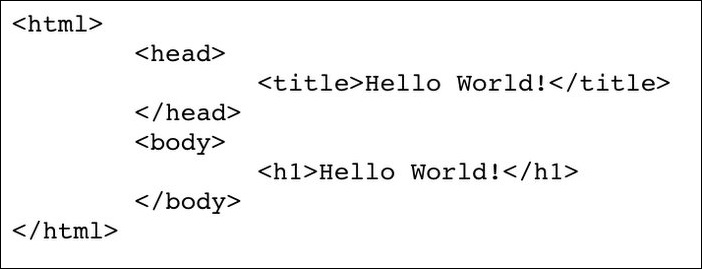
Following is the content of the hello.html file,

<html>
	<head>
		<title>Hello World!</title>
	</head>
	<body>
		<h1>Hello World!</h1>
	</body>
</html>

Build the project using the maven package command (ensure that you have maven installed and available on system path in your machine),

mvn package

Upload the htmllambda-0.0.1-SNAPSHOT.jar created in target folder to AWS lambda as shown below. This assumes that a basic lambda role is already created using AWS IAM console. Ensure that this role (lambda_basic_execution) has at least the predefined policy AWSLambdaBasicExecutionRole attached to it. Once lambda function is created, click on the Test button to verify the html output.
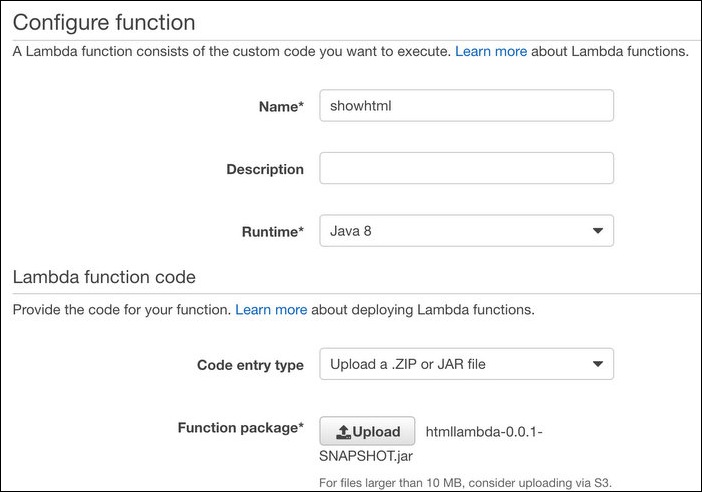
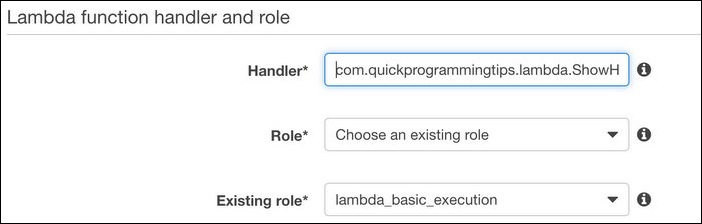
create-lamba-1

create-lambda-2

We can now configure a simple API gateway endpoint to use the above lambda function to output static html.

From API gateway, click on Create API. Name the new API as htmldemo. From Actions menu, click on Create Method and select GET. Select the region where lambda is hosted and select the lambda function as shown below. Click Save.
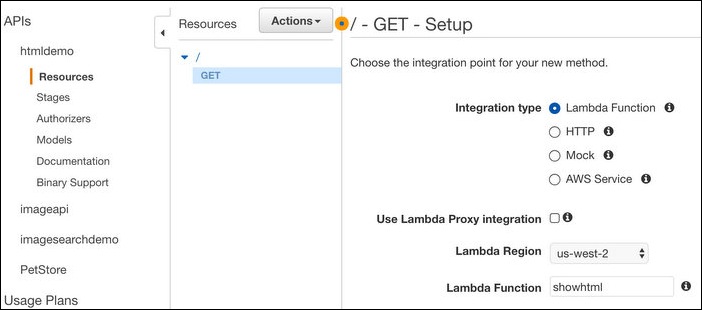
link-api-gateway-lambda

From Actions menu, click on Deploy API. Whenever any change is made to the API configuration, it needs to be deployed before it is available at the URL endpoint. This allows us to deploy different configurations to different stages (production, staging, qa etc.). When you deploying for the first time, you need to create a stage. Give it a name beta. This will enable the API on a public URL as shown below,
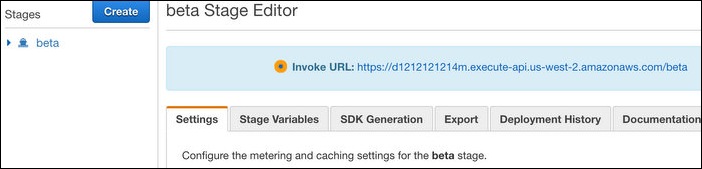
api-gateway-deploy

Click on the URL to open it in a browser window.
hello-world-json

Browser renders our hello world html as raw text! This is due to the default JSON content type set by API gateway. Also note that our content has double quotes around it. Let us now modify API gateway configuration to remove double quotes and set our content type as html.

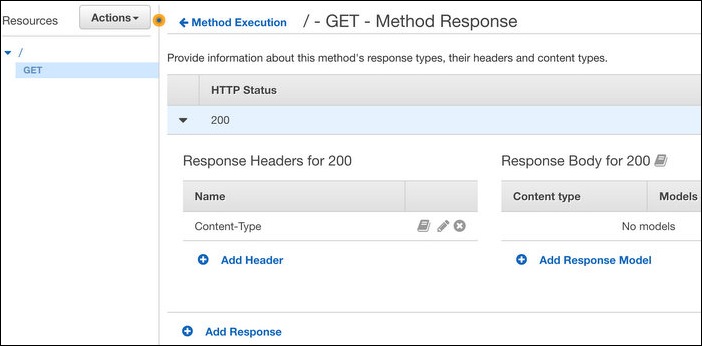
Click on GET under resources for htmldemo API. Click on Method Response on the right window. Remove application/json entry and then add Content-Type header as shown below.
api-gateway-method-response

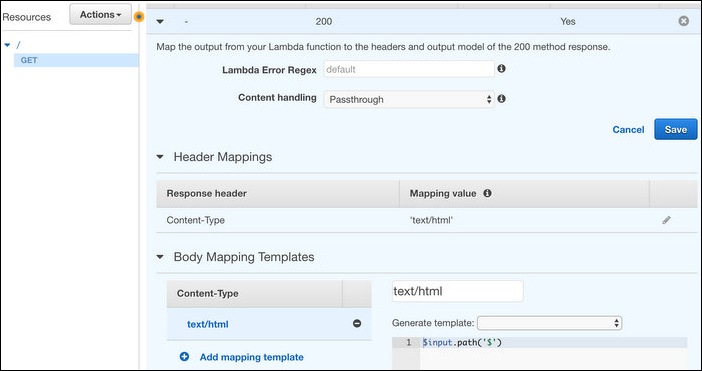
Click on GET under resources for htmldemo API. Click on Integration Response on the right window. Under Header Mappings, configure mapping value for Content Type as 'text/html'. Please note that single quotes must be preserved in the text. Under Body Mapping Templates, remove application/json and then add text/html with the following template content,

$input.path('$')
api-gateway-integration-response

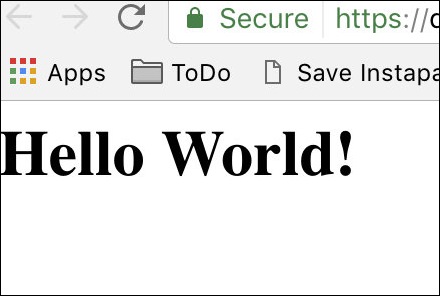
Now deploy the changed configuration. From Actions menu, click on Deploy API and deploy it to the beta stage we created earlier. Wait for a few seconds and then click on the API URL. If everything goes well, you should see the Hello World! output (beware of the browser cache!) in the browser.
hello-world-html-output

How to Pick a Random Number in Java

Random numbers have a wide range of programming uses such as in games, encrypting data etc. Java has multiple classes for generating random numbers. Deciding which one to use depends a lot on the program requirements. Here are some of the Random generator classes and their primary purpose,

  • java.util.Random - This is the simplest implementation of pseudorandom random numbers. This is suitable for simple usage scenarios such as selecting a random game move. This class is thread safe but its performance may be an issue in multithreaded programs. This class is not cryptographically secure.
  • java.util.concurrent.ThreadLocalRandom - This is a derived class of java.util.Random and is designed for use in multithreaded programs. This class is not cryptographically secure. Use this class if you are writing a multithreaded program with random numbers generated across threads.
  • java.security.SecureRandom - This is also a derived class of java.util.Random and is designed to generate cryptographically strong random numbers. Use this class in your encryption methods.  However note that this method is much slower than other methods.

The following Java source code contains examples of using the above classes to generate random numbers in a range. Pick the function appropriate to your program as indicated above.

How to Pick a Random Number in Java

import java.security.SecureRandom;
import java.util.Random;
import java.util.concurrent.ThreadLocalRandom;

// Various methods to generate random numbers in Java
public class RandomMethods {
    public static void main(String[] args) {
        System.out.println(getSimpleRandomNumber(10)); // 1 to 10
        System.out.println(getThreadSafeRandomNumber(5)); // 1 to 5
        System.out.println(getSimpleRandomNumber(1000)); // 1 to 1000
    }
    
    // Returns integer between 1 and maxValue both inclusive
    // Use this for simple uses such as a game move
    public static int getSimpleRandomNumber(int maxValue) {
        Random r = new Random();
        return r.nextInt(maxValue)+1;
    }
    
    // Returns integer between 1 and maxValue both inclusive
    // Use this in multithreaded programs
    public static int getThreadSafeRandomNumber(int maxValue) {
        ThreadLocalRandom r = ThreadLocalRandom.current();
        return r.nextInt(maxValue)+1;
    }
    
    // Returns integer between 1 and maxValue both inclusive
    // Use this in encryption methods. This is slower than other methods.
    public static int getRandomNumberForEncryption(int maxValue) {
        SecureRandom r = new SecureRandom();
        return r.nextInt(maxValue);
    }
}

Towers of Hanoi Recursive Solution in Java

Towers of Hanoi is a well known mathematical game/puzzle involving three pegs and a number of discs. The size of the discs are different and they are kept on the source peg with the smallest on the top and the biggest one on the bottom. The aim of the game is to move all the discs to a target peg with the same order using just a spare peg. The rules are,

  • Only one disc can be moved at a time
  • Each move consists of taking one disc from a peg and putting on top of another peg
  • A disc cannot be placed over a smaller disc

History of Towers of Hanoi

French mathematician Edouard Lucas invented towers of Hanoi in 1883. One popular myth about towers of Hanoi suggests that there was a temple in India where priests worked on solving a 64 disc towers of Hanoi puzzle (known as tower of Brahma). Priests believed that when the last move of the puzzle is completed, world will end. Interestingly if the moves are made at the rate of one move per second, it will take more than 500 billion years to solve the puzzle!

Solving Towers of Hanoi Using Recursion

The number of steps required to move n discs from source page to target peg is (2 raised to n - 1). For example, it would take 7(2 raised to 3 - 1) steps to move 3 discs from source peg to target peg.

This puzzle can be concisely solved using recursion. Let us look at the strategy of solving towers of Hanoi with just 2 discs.

  • Move disc 1 from source peg to spare peg
  • Move disc 2 from source peg to target peg
  • Move disc 1 from spare peg to target peg

For n number of discs we can generalize the above strategy as follows,

  • Move n-1 discs from source peg to spare peg
  • Move last disc from source peg to target peg
  • Move n-1 discs from spare peg to target peg

The first step of moving n-1 discs from source to spare peg is identical to our original problem, only difference being that the roles of the pegs change (spare peg becomes target and target peg becomes the spare peg)! This shows that we can recursively solve Towers of Hanoi. The termination condition for recursion will be n=1.

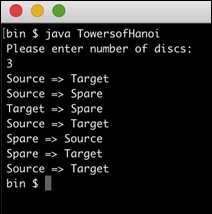
The following Java program uses the above recursive strategy to solve Towers of Hanoi puzzle. The program will print the moves of the towers of Hanoi solution in the console.

import java.util.Scanner;

// Towers of Hanoi solution source code in Java
// Uses recursion
public class TowersofHanoi {
    public static final String SOURCE_PEG = "Source";
    public static final String TARGET_PEG = "Target";
    public static final String SPARE_PEG = "Spare";

    public static void main(String[] args) {
        Scanner scanner = new Scanner(System.in);
        System.out.println("Please enter number of discs:");
        int numberOfDiscs = scanner.nextInt();
        solveTowersOfHanoi(numberOfDiscs, SOURCE_PEG, TARGET_PEG, SPARE_PEG);
        scanner.close();
    }

    // Solve towers of hanoi puzzle using recursion
    // Note the change roles of pegs internally
    private static void solveTowersOfHanoi(int numberOfDiscs, String sourcePeg, String targetPeg, String sparePeg) {
        if (numberOfDiscs == 1) {
            System.out.println(sourcePeg + " => " + targetPeg);
        } else {
            solveTowersOfHanoi(numberOfDiscs - 1, sourcePeg, sparePeg, targetPeg);
            System.out.println(sourcePeg + " => " + targetPeg);
            solveTowersOfHanoi(numberOfDiscs - 1, sparePeg, targetPeg, sourcePeg);
        }

    }
}

towers of hanoi java output The heart of the program is the function solveTowersOfHanoi. It takes 4 parameters - number of discs to solve, source peg name, target peg name and spare peg name. It then immediately solves the problem if there is only 1 disc.
If there is more than 1 disc, the function tries to move n - 1 discs from source peg to spare peg (note that the original peg in this case becomes the spare peg!). This is recursive and hence all discs except the last one will be moved from source peg to spare peg. Then the final disc is moved from source peg to target peg. Finally n - 1 discs will be moved from spare peg to target peg in recursive mode. This completes the towers of Hanoi puzzle.

Dice Roller in Java Source Code

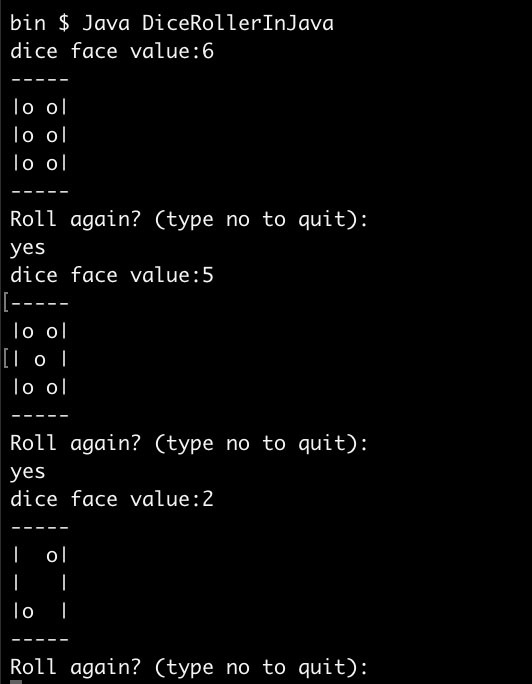
A six faced dice is used in various gambling games. The following Java program simulates the standard 6 face dice game. The program uses an infinite loop to roll dice until the user decides to exit the program. In addition to printing the face value, the following program can also draw the dice face using ascii characters.

How to Implement Dice Roller Game in Java

import java.util.Random;
import java.util.Scanner;

// dice roller java source code
// Also outputs the dice face as ASCII art
public class DiceRollerInJava {

    // This has printing information for all numbers
    // For each number,3x3 matrix represents the face
    int[][][] faceConfig = { { { 0, 0, 0 }, { 0, 1, 0 }, { 0, 0, 0 } }, 
                           { { 0, 0, 1 }, { 0, 0, 0 }, { 1, 0, 0 } },
                           { { 0, 0, 1 }, { 0, 1, 0 }, { 1, 0, 0 } }, 
                           { { 1, 0, 1 }, { 0, 0, 0 }, { 1, 0, 1 } },
                           { { 1, 0, 1 }, { 0, 1, 0 }, { 1, 0, 1 } }, 
                           { { 1, 0, 1 }, { 1, 0, 1 }, { 1, 0, 1 } } };

    public static void main(String[] args) {
        Scanner scanner = new Scanner(System.in);
        DiceRollerInJava dice = new DiceRollerInJava();
        while (true) {
            int result = dice.roll();
            System.out.println("dice face value:" + result);
            dice.draw(result);

            System.out.println("Roll again? (type no to quit):");
            String input = scanner.nextLine();
            if (input.equalsIgnoreCase("n") || 
                    input.equalsIgnoreCase("no")) {
                System.out.println("Bye!");
                scanner.close();
                return;
            }
        }
    }

    // Draw the dice face using ascii characters
    private void draw(int value) {
        int[][] displayVal = faceConfig[value - 1];
        System.out.println("-----");

        for (int i = 0; i < 3; i++) {
            System.out.print("|");
            for (int j = 0; j < 3; j++) {
                if (displayVal[i][j] == 1) {
                    System.out.print("o");
                } else {
                    System.out.print(" ");
                }
            }
            System.out.println("|");
        }
        System.out.println("-----");

    }

    // Roll the dice in Java
    private int roll() {
        Random r = new Random();
        return r.nextInt(6) + 1;
    }
}

Here is the Java dice rolling game in action,

dice-roller-in-java

How to Remove Extension from Filename in Java

The following function removes extension from a filename using Java. However it will not modify the hidden file names in mac/linux which starts with a dot character.

A different implementation is available as part of the Apache commons IO library.

// Java example: removes extension from a file name.
public class ExtensionRemover {

    public static void main(String[] args) {
        String fileName = "a.hello.jpg";
        System.out.println(removeExtension(fileName));

    }

    // Remove extension from file name
    // Ignore file names starting with .
    public static String removeExtension(String fileName) {
        if (fileName.indexOf(".") > 0) {
            return fileName.substring(0, fileName.lastIndexOf("."));
        } else {
            return fileName;
        }

    }
}